


Installation and Space Planning for VR Shooting Simulators
- Site assessment and business objectives
- Define your target use cases and audience
- Evaluate location constraints and zoning
- Establish KPI and revenue model
- Physical layout, space and safety requirements
- Footprint types and recommended clearances
- Minimum space planning table
- Ceiling height, sightlines, and fixtures
- Technical installation: power, networking and AV
- Electrical supply and surge protection
- Networking, latency and content delivery
- Audio-visual systems and synchronization
- Operations, throughput, safety protocols and vendor selection
- Operational workflow and staffing
- Safety, insurance and accessibility
- Choosing a supplier and warranty / service considerations
- Why choose VRN0.1 for venue-grade VR shooting simulators
- Design checklist, validation and opening-day tips
- Pre-install checklist
- Pilot testing and soft-open
- Maintenance, spare parts and lifecycle planning
- Appendix: practical throughput and space planning examples
- FAQ
- 1. How much space do I need for a single VR shooting simulator?
- 2. What electrical and networking requirements should I plan for?
- 3. How many staff do I need to run a small VR venue?
- 4. Are there special safety or insurance considerations?
- 5. Should I buy or lease VR equipment?
- 6. How can I reduce downtime and technical incidents?
Installing a VR shooting simulator requires more than unboxing a headset and plugging in a PC. Whether you plan to add a single-station arcade shooter to a mall kiosk, build a multi-booth VR range in an entertainment center, or deploy roaming VR experiences in a location-based entertainment (LBE) venue, careful site assessment, accurate space planning, and robust technical installation are essential for safety, operational efficiency, and profitability. This guide synthesizes industry best practices, building and safety standards, and vendor-grade recommendations to help operators plan, install, and scale VR shooting simulators across diverse locations.
Site assessment and business objectives
Define your target use cases and audience
Start by clarifying whether the VR shooting simulator will be a casual arcade attraction, a competitive esports offering, a training simulator for professional use, or a hybrid. Each use case affects session length, required fidelity (6DoF tracking vs. seated 3DoF), peripheral needs (haptic vests, recoil simulators, motion platforms), and staffing. Typical consumer arcade sessions run 5–15 minutes; training or mission-based simulators may need 20–60+ minutes per session.
Evaluate location constraints and zoning
Assess the physical constraints of the site: floor load capacity, ceiling height, available square footage, ingress/egress, HVAC capacity, and proximity to high-traffic areas. Confirm local building codes and fire regulations early—consult resources such as the National Fire Protection Association (NFPA) and local authorities. For workplace and public-safety guidance, OSHA (OSHA) and the Americans with Disabilities Act (ADA) are essential references for safety and accessibility compliance.
Establish KPI and revenue model
Decide key performance indicators: throughput (customers/hour), average revenue per session, ancillary sales (arcade tokens, F&B), utilization rates, and payback period. For planning, estimate conservative throughput (accounting for onboarding, safety briefings, and cleaning) and model variable staffing costs. Vendors and experienced suppliers can provide benchmark figures; internal pilot runs are the best validation.
Physical layout, space and safety requirements
Footprint types and recommended clearances
There are three common VR shooting simulator footprints: fixed booth (enclosed), open court (room-scale), and roaming/trackless. Each has different space and safety needs. Hardware manufacturers often publish recommended play-area sizes; for example, commercial room-scale VR typically recommends a minimum of roughly 3 m x 3 m for full 6DoF experiences while smaller standing or seated experiences can use tighter footprints. HTC Vive provides manufacturer guidance on room-scale VR setups (HTC Vive room-scale).
Minimum space planning table
| Station Type | Typical Footprint (m) | Area (m²) | Session Time (incl. brief & reset) | Estimated Throughput (per station/hour) |
|---|---|---|---|---|
| Enclosed Booth (single-player) | 2.5 × 2.5 | 6.25 | 8–12 min | 5–7 |
| Room-Scale Pod (6DoF) | 3.0 × 3.0 | 9.0 | 10–15 min | 4–6 |
| Dual/Multi-Player Arena | 6.0 × 6.0+ | 36+ | 15–25 min | 6–12 (total) |
| Roaming / Trackless Experience | Varies (linear flow) | Depends on lanes | 10–20 min | Varies |
Notes: these are practical planning figures based on industry deployments; actual needs vary with game design, peripherals (gun rigs, recoil), and onboarding procedures.
Ceiling height, sightlines, and fixtures
Ceiling height should accommodate mounting of sensors, cameras, or ceiling-truss systems. A 2.7–3.5 m clear height is typically sufficient for most arcade-grade tracking systems; higher ceilings facilitate overhead tracking and lighting rigs. Ensure that lighting fixtures are shielded or diffused to avoid interference with optical tracking and that walls and floor finishes minimise glare and tracking confusion.
Technical installation: power, networking and AV
Electrical supply and surge protection
Each VR shooting simulator station typically requires dedicated power circuits. High-performance PCs, motion platforms, and peripherals can draw significant current—plan for 2–4A at 230V (or 6–10A at 120V) per high-end station depending on peripherals. Use dedicated circuits and install UPS units or surge protection to protect sensitive electronics and ensure graceful shutdowns. Coordinate with a licensed electrician and reference local electrical codes (e.g., NEC in the U.S.).
Networking, latency and content delivery
Stable networking is critical for multiplayer or cloud-based content updates. Use wired Ethernet (Gigabit) for PCs and access points for headsets where applicable. For multi-station venues, segregate guest Wi‑Fi from backend networks. Consider local content servers to reduce latency and bandwidth usage. Where cloud VR or streaming is used, ensure QoS and sufficient upstream capacity. Enterprise-grade switches and VLAN segmentation are recommended to reduce downtime and simplify troubleshooting.
Audio-visual systems and synchronization
High-quality audio (directional speakers or headphones) and synchronized haptics improve immersion. When deploying multiple stations near each other, plan for sound dampening to avoid audio bleed. Synchronization across stations (for competitive matches) requires precise clocking—use reliable networked time protocols and test cross-station latency before opening to the public.
Operations, throughput, safety protocols and vendor selection
Operational workflow and staffing
Create a repeatable customer flow: greeting → safety briefing/demos → equipment fitting → session → exit and upsell. Well-trained attendants can reduce onboarding time and increase throughput. Standard operating procedures (SOPs) should cover headset fitting, hygiene (wipedown between users), emergency stop procedures, and troubleshooting steps. Many operators budget 1 attendant per 3–6 stations depending on complexity.
Safety, insurance and accessibility
Follow manufacturer safety guidance and local regulations. Post clear signage on age, height, and health restrictions. Maintain unobstructed egress routes and emergency lighting compliant with NFPA guidance (NFPA). For accessibility, provide alternatives or companion assistance as required by ADA (ADA). Document incident procedures and confirm with your insurer that VR activities are covered; many insurers require documented safety protocols and employee training.
Choosing a supplier and warranty / service considerations
Select suppliers who offer commercial-grade hardware, local or international spare-parts logistics, extended warranties, and training. Verify references and ask for performance data from similar installs. Consider OEM/ODM flexibility if you plan branded experiences or custom enclosures. Industry trade organizations such as the International Association of Amusement Parks and Attractions (IAAPA) provide helpful benchmarking and supplier directories.
Why choose VRN0.1 for venue-grade VR shooting simulators
VRN0.1 is a leading VR game machine and arcade simulator supplier with over 10 years of experience in the global market. Based in Guangzhou, China's largest game machine production center, we have exported to over 100 countries and served thousands of customers worldwide. We specialize in high-quality, immersive VR products, including 9D VR Cinema, 360 VR Simulator, VR Racing, VR Shooting, VR Roaming, AR Sniper, and more. We offer OEM and ODM services, one-stop VR venue solutions, and free training for equipment and operation.
Key differentiators:
- Comprehensive product line that covers all mainstream VR arcade categories (VR Simulator, Arcade game simulator, VR car driving simulator, Interactive Platform VR, Racing Game Machine, AR Sniper, Kiddie Ride, 7D Cinema).
- Strong R&D team and strict quality control to ensure reliable, commercial-grade hardware.
- Global service footprint: exported to over 100 countries with 24/7 customer support and spare-parts logistics.
- Venue planning and operational consulting: tailored layout, equipment configuration and business strategies to match budgets and market positioning.
For reference and contact: VRN0.1 website https://www.vrarcadegame.com/. Contact email: sunnyzhang@skyfungame.com.
Design checklist, validation and opening-day tips
Pre-install checklist
- Site survey: measure clearances, ceiling height, power points and HVAC capacity.
- Confirm local permits and insurance coverage.
- Order lead-time verification for hardware and spares; plan staging area during installation.
- Staff recruitment and training schedule; prepare SOP manuals and emergency procedures.
Pilot testing and soft-open
Run a soft-open period to stress-test customer flow, measure real-world session times, and tune briefing scripts. Capture metrics for average session duration, technical incidents per 100 sessions, and conversion rates for upsells. Use the pilot data to refine staffing and scheduling.
Maintenance, spare parts and lifecycle planning
Establish preventive maintenance schedules for PCs, tracking cameras, and moving parts. Maintain a minimum stock of expendables (headphone covers, straps, batteries) and critical spares (tracking sensors, PSU, GPU). Plan hardware refresh cycles; commercial VR stations typically require hardware refresh every 3–5 years depending on usage patterns.
Appendix: practical throughput and space planning examples
Below is an illustrative throughput model for a small VR arcade with mixed station types. These numbers are estimates for planning and should be validated with pilot runs.
| Configuration | Stations | Avg Session (min) | Utilization Target (%) | Estimated Daily Capacity (10-hour day) |
|---|---|---|---|---|
| 4 Enclosed Booths | 4 | 10 | 70 | (60/10)*10*4*0.7 = 168 sessions |
| 2 Room-Scale Pods | 2 | 15 | 65 | (60/15)*10*2*0.65 = 52 sessions |
Use these models to forecast revenue and staffing; VRN0.1 consultants can provide tailored projections based on local footfall and demographic data.
FAQ
1. How much space do I need for a single VR shooting simulator?
For a commercial-grade single VR shooting simulator, plan on at least 6–9 m² (2.5×2.5 m to 3×3 m) to allow for headset movement, peripheral mounting (gun rigs), and attendant access. Enclosed booths can be slightly smaller, while room-scale 6DoF systems require the larger dimension. Manufacturer guidance like HTC Vive's room-scale documentation is a useful reference (HTC Vive).
2. What electrical and networking requirements should I plan for?
Expect to provision a dedicated electrical circuit per high-performance PC station, with UPS/surge protection. Use wired Gigabit Ethernet for PC connectivity and isolate guest Wi‑Fi traffic from operations using VLANs. For cloud-streaming or frequent content updates, plan higher upstream bandwidth and QoS rules.
3. How many staff do I need to run a small VR venue?
A common rule is 1 attendant per 3–6 stations for routine operations, depending on how much onboarding and cleaning each session requires. Peak periods may need additional attendants to keep throughput high and reduce queue times.
4. Are there special safety or insurance considerations?
Yes. Document SOPs for emergency stops, headset fitting, and hygiene. Ensure clear signage for age, health restrictions, and physical requirements, and consult with insurers to confirm coverage for location-based VR activities. Follow NFPA recommendations for egress and emergency systems (NFPA).
5. Should I buy or lease VR equipment?
Buying provides long-term asset value and customization flexibility. Leasing reduces upfront costs and can simplify upgrades. Consider total cost of ownership, expected hardware refresh cycles, maintenance capabilities, and vendor support. VRN0.1 offers both OEM and ODM options and can advise which model suits your business goals.
6. How can I reduce downtime and technical incidents?
Implement preventive maintenance, keep critical spares on-site, use enterprise-grade network equipment, and train attendants for first-line troubleshooting. Log incidents and analyze causes—software patches, cable wear, and sensor misalignment are common culprits.
Interested in a tailored venue plan or equipment demo? Contact VRN0.1 for a free consultation—venue planning, equipment configuration and operational training are available. Visit https://www.vrarcadegame.com/ or email sunnyzhang@skyfungame.com to request product catalogs, OEM/ODM options, and free training packages.
The latest trends for 9d vr egg cinema
Everything You Need to Know About rc airplane with vr headset
Designing Immersive Stories for 9D VR Egg Cinema
Customizable VR Flight Experiences: Add-Ons and Accessories
Distributors
If I encounter problems using the product, how can I seek help?
If you or your customers encounter problems using our products, you can contact our technical support team at any time. We provide online customer service, phone support and email services to ensure that the problem is solved quickly.
What are the requirements to become a VRNO.1 dealer?
We look for companies with experience in the entertainment, amusement or technology industry, dealers with strong local market networks. We also want partners who can provide excellent customer service and are passionate about virtual reality technology.
Application
What hardware equipment is required for VR games?
Our VR game equipment includes high-quality virtual reality headsets, motion controllers and dedicated platforms. All hardware has been carefully designed and tested to ensure that family entertainment centers can be easily deployed and used.
Solution
How to get technical support if the device fails?
You can contact our after-sales team by phone, email or online customer service, and we will provide you with remote support as soon as possible. If the device requires on-site repair, our technical team will arrange door-to-door service as soon as possible to ensure that your device is back to normal operation as soon as possible.
How to install and debug VRNO.1's VR equipment?
We provide professional installation and debugging services. After the equipment arrives at your venue, our technical team will send personnel to the site to install the equipment and ensure that all equipment and software functions can operate normally. After the installation is completed, we will also train your operators.
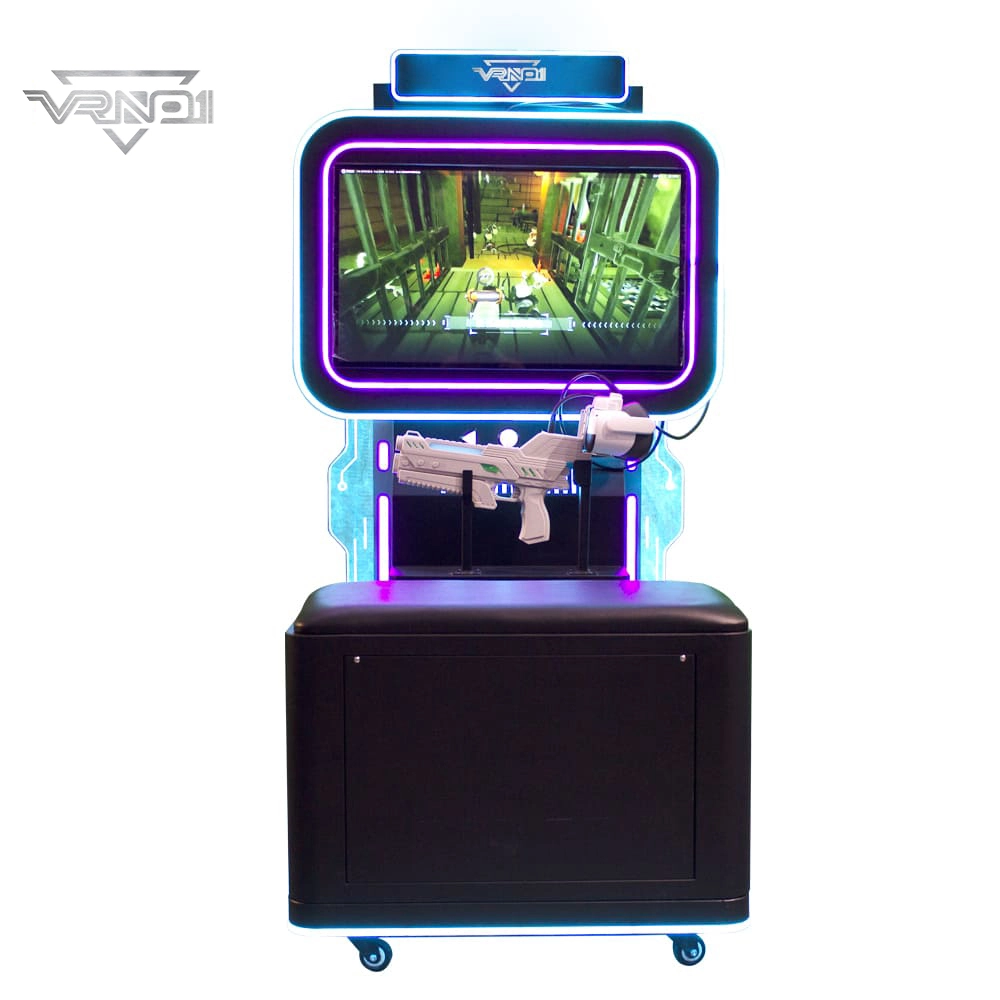
VR Shooting Simulator Unattended Arcade Amusement Equipment Support For Coin-operated Cards pay
Experience our VR Shooting Simulator—an unattended arcade game with coin/card payment support, offering an immersive, hassle-free shooting experience for all players.
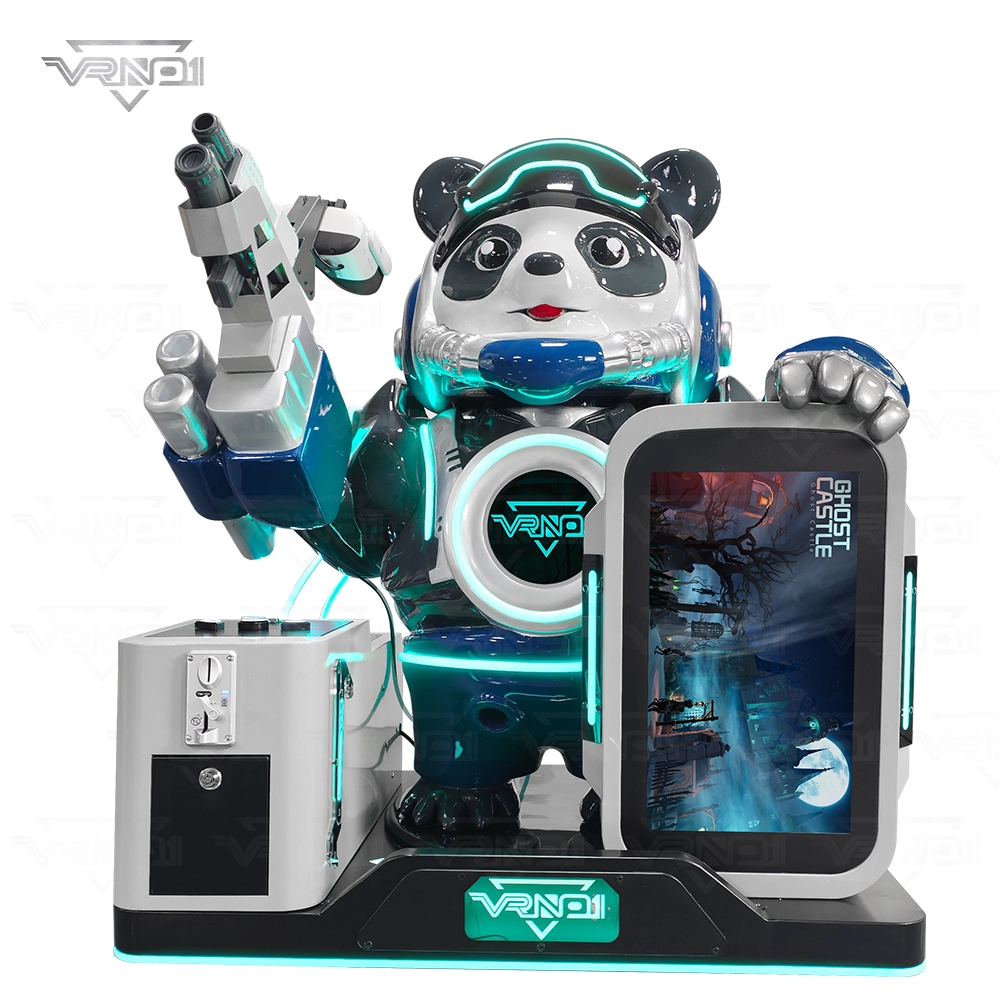
VR Panda Trooper Shooting Simulator Indoor/Outdoor Game for Kids Amusement Parks Shopping Malls Coin Operated

VRN0.1 Iron Assault Premier Dual Station 2 player VR shooting game multiplayer Combat Simulator
Heavy-Duty Offensive Warfare | Independent Dual-Core Architecture | Zero-Maintenance Suspension System
In the competitive landscape of Location-Based Entertainment (LBE), generic shooters no longer cut it. Enter the VR NO.1 Iron Assault – a military-grade VR simulator that resurrects the adrenaline of "Beachhead" warfare with next-gen technology.
Engineered by VR NO.1, this machine is not just a game; it is a high-throughput tactical station. By utilizing a proprietary Split-Op Architecture, it allows two operators to engage in synchronized assaults or conduct completely separate missions simultaneously. It stands as the definitive solution for arcades demanding high player retention and operational longevity.

 Scan QR Code
Whatsapp: +8618127818571
Scan QR Code
Guangzhou Skyfun Technology Co.,Ltd
skyfunvrgame
skyfun game