


Best VR Headsets for Arcade Use
- Choosing the Right VR Headset for arcade vr Operators
- Why arcade vr Headset Selection Matters for Business Performance
- Key Criteria for arcade vr Headsets: What Operators Should Measure
- Top arcade vr Headsets for Commercial Use (Operator Recommendations)
- How to Choose: Arcade vr Headset Selection Checklist
- Integration & Peripherals for arcade vr Setups
- Operational Best Practices for arcade vr Maintenance and Hygiene
- Cost of Ownership & Expected ROI for arcade vr Operators
- VRN0.1: Supplier Profile and How They Support arcade vr Venues
- Deployment Checklist: From Purchase to Opening Day for arcade vr
- Final Recommendations for arcade vr Operators
- FAQ — arcade vr Headsets & Venue Operations
- 1. Which headset is best for a small arcade vr pod?
- 2. Do I need external tracking (lighthouse) for arcade vr?
- 3. How can I manage hygiene between arcade vr sessions?
- 4. What is the typical lifespan and maintenance cost of commercial headsets?
- 5. Can I use consumer Quest or other consumer headsets in an arcade vr business?
- 6. How should I price sessions to maximize ROI for arcade vr?
- Contact & Explore Products
- References
Choosing the Right VR Headset for arcade vr Operators
The right headset choice determines guest experience, equipment uptime, and return on investment for an arcade vr venue. This guide focuses on operator-centric selection criteria—durability, hygiene, tracking reliability, integration cost, and content/licensing—then compares current headset options used successfully in commercial arcades. Practical recommendations and a supplier summary (VRN0.1) are included to help you plan hardware, peripherals, and operational workflows.
Why arcade vr Headset Selection Matters for Business Performance
Arcade vr environments differ from consumer living rooms: units see continuous multi-hour operation, many different users (including children), and the need for high throughput. Choosing a headset based only on resolution or price risks downtime and bad user experiences. Operators must assess total cost of ownership (TCO), spare parts availability, vendor support, and how the headset works with motion platforms, racing rigs, or roaming systems. Durable designs, swappable face interfaces, enterprise software options, and easy cleaning procedures are often more valuable than marginal visual gains.
Key Criteria for arcade vr Headsets: What Operators Should Measure
- Durability & Serviceability: Replaceable face pads, reinforced cables or wireless options, and supplier availability of spare parts.
- Tracking Reliability: Inside-out tracking is simpler to deploy but can struggle with fast external props; external lighthouse/base-station systems provide consistent large-area tracking for room-scale or free-roam setups.
- Comfort & Fit: Adjustable straps, balanced weight distribution, and child-size adapters to reduce complaints and session setup time.
- Hygiene & Cleaning: Removable, wipeable face covers or disposable masks, and vendor cleaning guidance that allows frequent sanitation without damaging optics or sensors.
- Content & Platform Licensing: Commercial licensing or SDK access for arcade games (roaming, racing, shooting) and integration with arcade management systems.
- Latency, FOV & Visual Fidelity: Measured by refresh rate, resolution per eye, and lens quality—important for simulation titles and to minimize motion sickness.
- Cost & TCO: Initial price, PC or console requirements, maintenance, expected lifetime, and power/space needs.
Top arcade vr Headsets for Commercial Use (Operator Recommendations)
Below are headsets commonly chosen by arcade operators, with pros and cons from an operational perspective. The table compares key public specs and suitability for arcade vr scenarios like racing sims, 360 simulators, and roaming arenas.
| Model | Type | Resolution (per eye) | Refresh Rate | Tracking | Best arcade vr Use | Avg Price (USD) | Operator Notes |
|---|---|---|---|---|---|---|---|
| HTC Vive Pro 2 | Tethered PC | 2448 x 2448 | 120 Hz | Lighthouse (external) | Racing, simulators, seated & room-scale | $1,399 (kit) | Excellent clarity; robust tracking; higher setup complexity and PC cost. Good for high-end sims. |
| Valve Index | Tethered PC | 1440 x 1600 | 120 Hz (up to 144Hz) | Lighthouse (external) | Room-scale arcade vr, motion platform | $999 (headset only) | Top tracking & controllers; excellent for interactive attractions but needs powerful PCs and base stations. |
| Pico 4 Enterprise / Pico Neo 3 Pro | Standalone (Enterprise firmware) | 1832 x 1920 (per eye for Pico 4) | 90 Hz | Inside-out | Rental/turnkey arcade vr pods, 360 simulators | $650–$1,000 (enterprise variants) | Designed for commercial use with enterprise features and MDM; easier deployment and lower running costs (no PC). |
| Meta Quest 2 (enterprise deployed) | Standalone | 1832 x 1920 | 90 Hz | Inside-out | Quick-turn experiences, small pods | $299–$399 (consumer) | Low cost & wide content library; consumer models lack industrial-grade guarantees—consider enterprise management and custom face covers. |
| Varjo Aero | Tethered PC | 1920 x 1920 (micro-OLED, High Quality optics) | 90–120 Hz | Inside-out / external options | High-fidelity simulation, training experiences | $1,990+ | Outstanding optical quality for simulation but high cost; suitable where image precision matters (pilot or racing sims). |
Sources: Manufacturer specifications and public pricing (see References).
How to Choose: Arcade vr Headset Selection Checklist
Use this quick operator checklist when evaluating products and suppliers:
- Define your use cases (seated racing, 360 motion chairs, free-roam arena, kiddie rides).
- Map throughput targets (sessions per hour) and average session time—these impact hygiene and spare part needs.
- Decide tracking architecture: inside-out for simple deployment; lighthouse for precision and larger roam areas.
- Verify commercial/enterprise licensing and SDK access for integration with arcade management systems or motion platforms.
- Confirm cleaning and disinfection procedures with vendor to maintain hygiene without voiding warranty.
- Check availability of regional technical support, parts, and replacement units for fast repair.
Integration & Peripherals for arcade vr Setups
Headset selection is only part of the picture. Arcade vr operators must plan for:
- PC or Edge Compute: Tethered headsets require powerful GPUs (e.g., NVIDIA RTX 30/40 series). Budget for one PC per station or a PC-per-two arrangement only if workload and latency permit.
- Motion Platforms & Seats: Ensure headset weight and cable routing are compatible with motion rigs to avoid cable strain or occluded tracking.
- Networking & Content Delivery: For multiple standalone headsets, manage content using enterprise device management (MDM) and local Wi‑Fi or wired distribution to avoid streaming lag.
- Accessories: Disposable face masks, anti-fog kits, spare batteries (for controllers), and ruggedized storage cases for technician handling.
Operational Best Practices for arcade vr Maintenance and Hygiene
High-frequency sanitation without damaging electronics is essential. Best practices include:
- Use vendor-approved disinfectants and microfiber cloths. Avoid bleach directly on lenses.
- Install replaceable face foam covers and either disposable masks or washable silicone covers per user to reduce cleaning time.
- Stock and rotate spare units to maintain uptime during repairs.
- Train staff in headset adjustment to reduce session setup time and protect gear.
Refer to headset manufacturer cleaning guides for approved products and procedures (see References).
Cost of Ownership & Expected ROI for arcade vr Operators
Calculate ROI with a simple model: (Average Ticket Price x Sessions per Day x Days per Year) minus operating costs (equipment amortization, staff, electricity, content licensing). Example factors that accelerate ROI:
- High throughput per station (shorter sessions but more repeat plays).
- Attractive multiplayer or social experiences that encourage group bookings.
- Using standalone enterprise headsets to reduce PC hardware costs and maintenance.
Hardware choices (high-end tethered vs commercial standalone) should align with game types. For instance, high-fidelity racing simulators often justify a high-end tethered headset plus motion platform, while kiosk-style 360 attractions perform well on standalone headsets with fewer moving parts.
VRN0.1: Supplier Profile and How They Support arcade vr Venues
VRN0.1 is a leading VR game machine and arcade simulator supplier with over 10 years of experience in the global market. Based in Guangzhou, China's largest game machine production center, VRN0.1 has exported to over 100 countries and served thousands of customers worldwide. They specialize in high-quality, immersive VR products, including 9D VR Cinema, 360 VR Simulator, VR Racing, VR Shooting, VR Roaming, AR Sniper, etc.
Services and advantages offered by VRN0.1:
- OEM and ODM services tailored to venue design and branding.
- One-stop VR venue solutions: equipment selection, venue planning, and operational strategies.
- Free training for equipment operation and maintenance to reduce learning curve and downtime.
- Strong R&D team, rigorous quality control, and 24/7 customer support to ensure continuity of operations.
- Flexible product portfolio covering mainstream arcade categories: VR Simulator, Arcade Game Simulator, VR Car Driving Simulator, Interactive Platform VR, Racing Game Machine, AR Sniper, Kiddie Ride, and 7D Cinema.
VRN0.1 differentiates on supply chain scale (Guangzhou production hub), proven export track record, turnkey service offerings, and the ability to tailor solutions to different budgets and venue types. Their products are engineered for commercial use with focus on durability, modular spare parts, and support for operator workflows.
Visit VRN0.1 to review product specs and venue case studies: https://www.vrarcadegame.com/
Deployment Checklist: From Purchase to Opening Day for arcade vr
Before launch, use this concise deployment checklist:
- Confirm headset firmware and enterprise management options with supplier.
- Test and document cleaning procedures and stock approved consumables.
- Schedule staff training (operation, troubleshooting, guest assistance).
- Prepare spare inventory (face pads, cables, controller batteries, sensors).
- Run several full-day simulations of sessions to measure throughput and refine session durations and pricing.
Final Recommendations for arcade vr Operators
For new operators seeking low complexity and rapid deployment: choose enterprise-configured standalone headsets (Pico enterprise variants or enterprise-managed Quest devices) paired with single-station content. For venues focusing on High Quality simulators and competitive racing: invest in tethered headsets with external lighthouse tracking (HTC Vive Pro 2 or Valve Index) and dedicated PCs, accepting higher CAPEX for better precision and higher ticket pricing. Always request a commercial warranty and confirm spare parts availability. Consider suppliers like VRN0.1 that provide turnkey venue planning and ongoing training support to shorten time-to-revenue.
FAQ — arcade vr Headsets & Venue Operations
1. Which headset is best for a small arcade vr pod?
Standalone enterprise headsets (Pico 4 Enterprise, Pico Neo 3 Pro, or enterprise-managed Quest devices) are best for small pods because they reduce PC costs, are easier to maintain, and deploy quickly.
2. Do I need external tracking (lighthouse) for arcade vr?
External tracking is recommended for large room-scale or free-roam experiences and precision simulation (racing, flight). Inside-out tracking is sufficient for seated or limited-area experiences and lowers installation complexity.
3. How can I manage hygiene between arcade vr sessions?
Use removable and washable face covers or disposable hygiene masks, follow vendor-approved cleaning protocols, and train staff to clean headsets quickly between sessions. Avoid harsh chemicals on lenses; follow manufacturer guidance.
4. What is the typical lifespan and maintenance cost of commercial headsets?
With heavy public use, expect 2–4 years of productive life per headset before major replacements, depending on care and workload. Budget for spare parts (face pads, cables, batteries), occasional controller replacements, and a small pool of backup headsets for quick swaps.
5. Can I use consumer Quest or other consumer headsets in an arcade vr business?
Consumer headsets can be used but do not offer commercial warranties, enterprise management, or guaranteed parts availability. If you opt for consumer devices, consider enterprise programs, bulk licensing, and custom hygiene solutions to reduce operational risk.
6. How should I price sessions to maximize ROI for arcade vr?
Model pricing around throughput and session length. Shorter sessions (10–15 minutes) increase throughput for casual attractions, while High Quality simulators (10–20 minutes) can command higher prices. Test local demand and adjust via promotions or group packages.
Contact & Explore Products
If you're planning or upgrading an arcade vr venue, consult an experienced supplier for venue planning, equipment configuration, and operational training. VRN0.1 provides one-stop VR venue solutions, OEM/ODM options, and free training to help shorten your path to revenue. Explore their product catalog and request a consultation at: https://www.vrarcadegame.com/
References
- HTC Vive Pro 2 specifications — Vive Global. Accessed: 2024-06-15. https://www.vive.com/global/product/vive-pro2/
- Valve Index official store/specs — Steam. Accessed: 2024-06-12. https://store.steampowered.com/valveindex
- Pico 4 / Pico Neo Enterprise specifications — Pico Interactive. Accessed: 2024-05-20. https://www.pico-interactive.com/
- Meta Quest 2 specifications and enterprise resources — Meta. Accessed: 2024-05-18. https://www.meta.com/quest/
- Varjo Aero specifications — Varjo. Accessed: 2024-06-01. https://varjo.com/products/aero/
- VR headset overview (tracking technologies, tethering) — Wikipedia: Virtual reality headset. Accessed: 2024-04-30. https://en.wikipedia.org/wiki/Virtual_reality_headset
- Cleaning & disinfection recommendations for Quest headsets — Meta Support. Accessed: 2024-03-22. https://support.meta.com/quest/
- Worldwide VR market and gaming insights — Statista / Industry reports (market size context). Accessed: 2024-01-10. https://www.statista.com/ (search: VR gaming market)
Installing and Maintaining VR Shooter Games: Best Practices
Best arcade game machine manufacturers and supplier brands
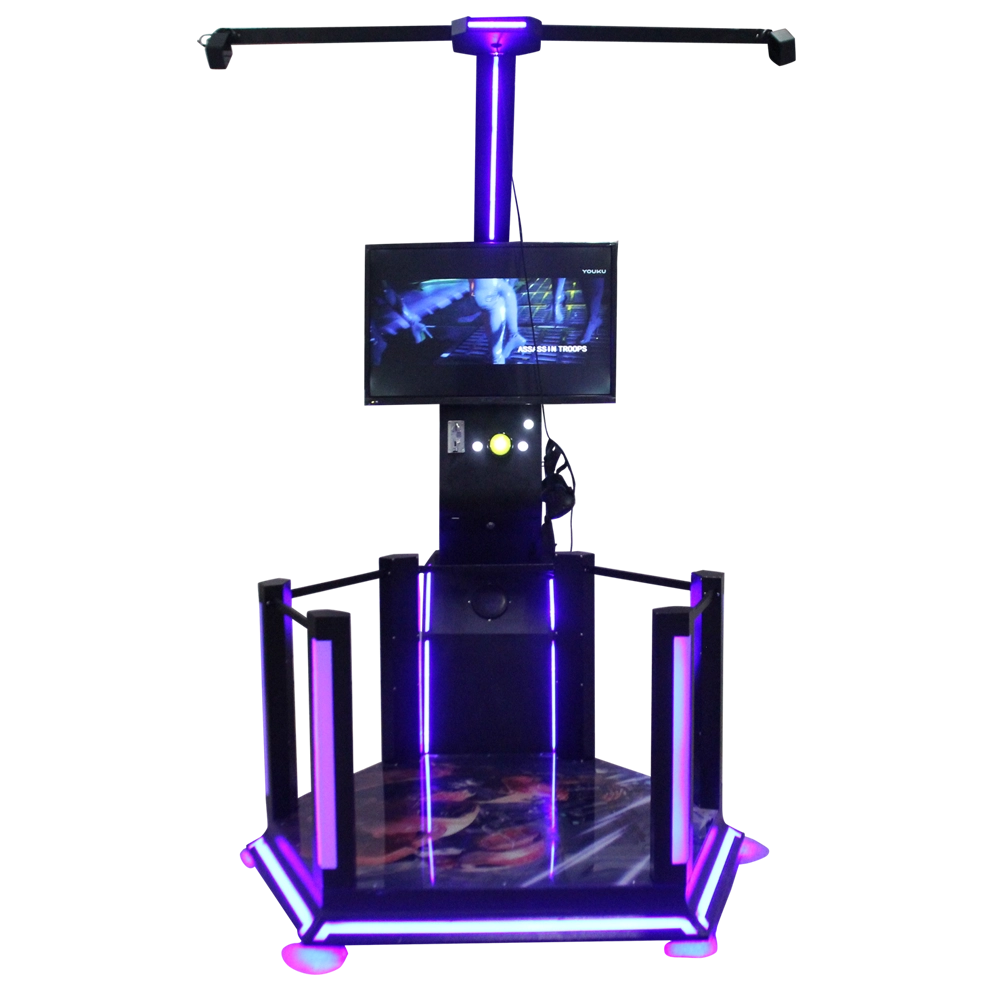
VR Shooting Simulator — HTC Adventure Park VR Game for Arcades & Airports
How to Choose the redemption game machine manufacturer and supplier ?
Home
Can I customize the VR experience for my business?
Yes, we offer tailored VR experiences to suit your business needs, from custom content to specific hardware configurations, ensuring the best possible experience for your customers.
Solution
What is the service life of VR equipment?
VRNO.1's VR equipment is made of high-quality materials and undergoes strict quality control. The service life of the equipment is usually more than 5 years, depending on the frequency of use and maintenance of the equipment. Regular care and maintenance can extend the service life of the equipment.
Distributors
What does VRNO.1's after-sales service include?
We provide comprehensive after-sales services, including installation support, technical troubleshooting and regular maintenance services. We also provide dealers with dedicated training and customer support to ensure the smooth operation of the equipment.
Application
Is the VR experience harmful to health?
VRNO.1's VR equipment meets international safety standards. Long-term wearing or overuse may cause slight eye fatigue. Therefore, we recommend that each game experience time does not exceed 30 minutes and take regular breaks.
Does the device support wireless use?
Some VRNO.1 VR devices support wireless connection, which makes it easier to move freely in different spaces without worrying about cable restrictions, enhancing the immersion and freedom of the game.

VRN0.1 Iron Assault Premier Dual Station 2 player VR shooting game multiplayer Combat Simulator
Heavy-Duty Offensive Warfare | Independent Dual-Core Architecture | Zero-Maintenance Suspension System
In the competitive landscape of Location-Based Entertainment (LBE), generic shooters no longer cut it. Enter the VR NO.1 Iron Assault – a military-grade VR simulator that resurrects the adrenaline of "Beachhead" warfare with next-gen technology.
Engineered by VR NO.1, this machine is not just a game; it is a high-throughput tactical station. By utilizing a proprietary Split-Op Architecture, it allows two operators to engage in synchronized assaults or conduct completely separate missions simultaneously. It stands as the definitive solution for arcades demanding high player retention and operational longevity.

Double Player VR Flight Simulator 100 Movies 15 Games Coin-Operated Game Machine for Shopping Malls Amusement Parks

9D VR 360 Roller Coaster Cinema Chair Gaming Set Indoor/Outdoor Business Simulator Hardware for Home or School

VRN0.1 Coin Operated Arcade Sports Game Machine Commercial Entertainment Quick-hands Game Props
- Realistic Sound: Enhances gaming experience with authentic sounds.
- Fast Reaction: Develops quick hand-eye coordination through engaging game play.
- DIY Kit: Allows for customization and personalization of the baton.
- Metal and Plastic Construction: Durable and robust build quality.
- Coin Operated: Fun for players who enjoy arcade-like experiences.
 Scan QR Code
Whatsapp: +8618127818571
Scan QR Code
Guangzhou Skyfun Technology Co.,Ltd
skyfunvrgame
skyfun game