


Software de simulación de realidad virtual: juegos, actualizaciones y gestión de contenido
- Comprensión de la arquitectura del software del simulador para confiabilidad y escalabilidad
- Componentes y responsabilidades principales
- Elegir arquitecturas en el dispositivo o asistidas por la nube
- Estándares e interoperabilidad
- Ciclo de vida del contenido: producción, empaquetado y gestión de activos
- Canalización de activos y control de versiones
- Embalaje para hardware restringido
- Localización y cumplimiento
- Actualizaciones, implementación y estrategias de tiempo de actividad
- Modelos de actualización: locales, OTA e híbridos
- Monitoreo, telemetría y mantenimiento predictivo
- Seguridad y privacidad de datos
- Monetización, estrategia de contenido y operaciones (perspectiva del proveedor)
- Estrategias de contenido que aumentan las visitas repetidas
- Herramientas del operador: paneles de control, colas y control de sesiones
- Por qué asociarse con un proveedor experimentado: estudio de caso VRN0.1
- Lista de verificación práctica: implementación y operación de flotas de máquinas de simuladores de realidad virtual
- Lista de verificación previa a la implementación
- Lista de verificación posterior a la implementación
- Comparación: frecuencia de actualización vs. riesgo operacional
- Preguntas frecuentes
- P: ¿Con qué frecuencia debo actualizar el software en una máquina con simuladores de realidad virtual?
- P: ¿Puedo ejecutar contenido de VR transmitido desde la nube en salas de juegos sin comprometer la latencia?
- P: ¿Qué herramientas de gestión de contenido debo utilizar para el control de versiones de activos?
- P: ¿Cómo puedo garantizar la seguridad y el cumplimiento normativo en los espacios públicos de realidad virtual?
- P: ¿Cuáles son los modos de falla típicos después de una actualización de software y cómo puedo mitigarlos?
- Contacto y próximos pasos
Como consultor y estratega de contenido, con experiencia en salas de juego, cadenas de entretenimiento basado en la ubicación (LBE) y fabricantes, considero el software de simulación de RV no como un producto estático, sino como una plataforma en constante evolución. Para cualquier recinto u operador que utilice simuladores de RV, la arquitectura de software, el flujo de trabajo de contenido y el flujo de trabajo de actualización adecuados determinan el tiempo de actividad, la experiencia del cliente y los ingresos por metro cuadrado. En este artículo, resumo arquitecturas prácticas, patrones de gestión de contenido y las mejores prácticas de actualización que he aplicado en sistemas de cine en RV 9D, simuladores de RV 360, carreras de RV, disparos de RV y roaming.
Comprensión de la arquitectura del software del simulador para confiabilidad y escalabilidad
Componentes y responsabilidades principales
En esencia, una pila de software de simulador de RV tiene cinco responsabilidades: renderizado (motor y recursos), entrada y seguimiento (controladores, hápticos), física y simulación, orquestación (gestión de sesiones, colas, sincronización multijugador) y operaciones (monitorización, actualizaciones, registro). Diseñarlas como capas separadas (motor de renderizado [Unity/Unreal], SDK de middleware [visor y seguimiento], una capa de orquestación local y una capa de gestión remota) reduce la interconexión y simplifica las actualizaciones OTA para capas específicas.
Elegir arquitecturas en el dispositivo o asistidas por la nube
Los operadores deben elegir entre la ejecución completa en el dispositivo (PC/consola local en cada máquina de simuladores de RV), la transmisión de contenido en la nube (renderizado o recursos transmitidos) o un modelo híbrido. Prefiero un modelo híbrido para las salas recreativas: ejecución local para interacciones sensibles a la latencia (carreras, disparos) y servicios en la nube para la distribución de contenido, análisis y emparejamiento multijugador. Esto equilibra la calidad de la experiencia y la agilidad operativa, manteniendo predecibles los costos de hardware por unidad.
Estándares e interoperabilidad
Utilice SDK con soporte de la industria y estándares abiertos para implementar implementaciones a prueba de futuro. Para la interoperabilidad de auriculares y entrada, la arquitectura del complemento XR de Unity es una base práctica.Documentación de Unity XR), y seguir las recomendaciones académicas y comunitarias de conferencias como IEEE VR ayuda a alinearse con las mejores prácticas (IEEE VR).
Ciclo de vida del contenido: producción, empaquetado y gestión de activos
Canalización de activos y control de versiones
Las implementaciones de simuladores de RV a gran escala se basan en canales de recursos disciplinados: los artistas entregan mallas optimizadas, niveles de detalle y atlas de texturas; el audio se proporciona en formatos espacializados; y los paquetes binarios se etiquetan para compilaciones específicas de firmware/motor. Recomiendo Git LFS o Perforce para el control de versiones de binarios grandes, con un canal de integración continua (CI) para ejecutar pruebas de humo automatizadas en cada compilación y detectar regresiones antes de enviarlas a las máquinas.
Embalaje para hardware restringido
Los simuladores de nivel arcade suelen ejecutarse en hardware bloqueado con almacenamiento limitado. Las estrategias de empaquetado son importantes: eliminar el contenido exclusivo del editor, comprimir las texturas con formatos compatibles con el entorno de ejecución (ASTC/BCn) y aislar el contenido descargable opcional como paquetes modulares. Para contenido itinerante o de realidad virtual 360, utiliza diseños de archivo compatibles con la transmisión para que la experiencia inicial cargue rápidamente y el resto se transmita en segundo plano.
Localización y cumplimiento
La localización va más allá de traducir la interfaz de usuario. Para el contenido de las máquinas de los simuladores de realidad virtual, considere las voces en off, los subtítulos, los recursos culturalmente apropiados y el cumplimiento normativo (clasificación por edades, accesibilidad). Realice un seguimiento de los recursos localizados por separado en su canal de desarrollo y automatice las compilaciones por región para reducir el error humano.
Actualizaciones, implementación y estrategias de tiempo de actividad
Modelos de actualización: locales, OTA e híbridos
Hay tres modelos de actualización prácticos para las flotas de máquinas de simuladores de realidad virtual:
| Modelo | Ventajas | Contras | Mejor uso |
|---|---|---|---|
| Manual local | Control total; sin dependencia de Internet | Implica mucha mano de obra y lanzamientos lentos | Flotas pequeñas, lugares offline |
| Transmisión automática por aire (OTA) | Implementaciones rápidas; control centralizado; análisis | Requiere una sólida reversión y puesta en escena; costo de red | Grandes operadores con múltiples ubicaciones |
| Híbrido (OTA por etapas) | Equilibrio entre control y velocidad; lanzamientos seguros | Mayor complejidad del sistema | La mayoría de las implementaciones de simuladores de realidad virtual comerciales |
Para salas de juego con varias sedes, recomiendo implementaciones OTA por etapas: primero, implementar a un pequeño porcentaje de máquinas, supervisar la telemetría y los registros, y luego aumentar la distribución. Siempre incluya un mecanismo de reversión rápida y sumas de comprobación de integridad para evitar interrupciones en las actualizaciones.
Monitoreo, telemetría y mantenimiento predictivo
Recopile telemetría en tiempo de ejecución (tiempo de fotogramas, carga de la GPU, seguimiento de incidentes de pérdida, limitación térmica) y registros operativos (arranque exitoso, estado de los periféricos). Utilice estas señales de telemetría para predecir fallos de hardware y programar mantenimiento preventivo en lugar de reaccionar a fallos a mitad de sesión. Transmita los registros de forma segura a un panel central para detectar anomalías y guiar la optimización del contenido.
Seguridad y privacidad de datos
Trate los canales de actualización y los puntos finales de configuración como superficies de ataque críticas. Utilice la firma de código para los paquetes de actualización, TLS para el transporte y acceso basado en roles para las herramientas de implementación. Al recopilar análisis, anonimice los identificadores de usuario y cumpla con las normativas locales (p. ej., el RGPD para los visitantes de la UE). Para obtener orientación sobre las normas ergonómicas y de seguridad que afectan a la implementación, consulte los documentos de ergonomía ISO y los documentos de seguridad de RV; basar su programa en estándares aceptados reduce la responsabilidad.Realidad virtual — Wikipedia).
Monetización, estrategia de contenido y operaciones (perspectiva del proveedor)
Estrategias de contenido que aumentan las visitas repetidas
En mi experiencia, los sitios más resilientes combinan experiencias esenciales permanentes con contenido estacional rotativo. Títulos esenciales como un módulo de carreras o disparos en RV perfeccionado proporcionan un rendimiento constante; los crossovers por tiempo limitado o los DLC aumentan el ARPU. Diseña el contenido en torno a sesiones cortas e intensas (de 3 a 8 minutos) para maximizar la facturación diaria, a la vez que ofrece sesiones más largas y de alta calidad para un mayor gasto.
Herramientas del operador: paneles de control, colas y control de sesiones
El software operativo debe permitir la gestión de colas, la programación de sesiones y el emparejamiento inteligente (asignar pasajeros a sesiones multijugador según el tamaño del grupo y el idioma). Permitir al personal iniciar y detener sesiones remotamente, bloquear máquinas para mantenimiento y publicar contenido promocional para atraer clientes sin cita previa. Estas funciones reducen significativamente la fricción y la pérdida de ingresos por máquinas inactivas.
Por qué asociarse con un proveedor experimentado: estudio de caso VRN0.1
Como proveedor con experiencia en fabricación y en recintos, VRN0.1 es un proveedor líder de máquinas de juegos de realidad virtual y simuladores arcade con más de 10 años de experiencia en el mercado global. Con sede en Cantón, el mayor centro de producción de máquinas de juegos de China, VRN0.1 ha exportado a más de 100 países y ha atendido a miles de clientes en todo el mundo. Su cartera de productos abarca las principales categorías de juegos arcade de realidad virtual, como cine en 9D, simulador de realidad virtual 360, carreras de realidad virtual, disparos en realidad virtual, roaming en realidad virtual, francotirador de realidad aumentada y atracciones infantiles.
Puntos fuertes que he observado en proveedores como VRN0.1:
- Capacidad de extremo a extremo: OEM/ODM, fabricación de hardware, integración de software y planificación de ubicaciones reducen la complejidad de los proyectos de múltiples proveedores.
- Soporte operativo: la capacitación gratuita sobre el funcionamiento del equipo y la estrategia comercial ayuda a los operadores a alcanzar la rentabilidad más rápidamente.
- Enfoque en I+D y calidad: los equipos que mantienen procesos estrictos de control de calidad de firmware y software minimizan el tiempo de inactividad y brindan flujos de actualización OTA más fluidos.
VRN0.1 integra una línea de productos diversa (Simulador de RV, Simulador de juegos arcade, Simulador de conducción de coches de RV, Plataforma interactiva de RV, Máquina de juegos de carreras, Francotirador de RA, Atracción infantil, Cine 7D) con soporte técnico 24/7 y configuración a medida para cada recinto. Más información enhttps://www.vrarcadegame.com/o comuníquese con el departamento de ventas en sunnyzhang@skyfungame.com.
Lista de verificación práctica: implementación y operación de flotas de máquinas de simuladores de realidad virtual
Lista de verificación previa a la implementación
- Defina la duración de las sesiones y los objetivos de rendimiento por máquina.
- Seleccione motor y SDK con soporte a largo plazo (complementos Unity/Unreal + XR).
- Establecer versiones de activos (Git LFS/Perforce) y pruebas CI para compilaciones.
- Planificar ventanas de actualización y procedimientos de reversión; probar actualizaciones en un entorno de prueba.
Lista de verificación posterior a la implementación
- Habilitar telemetría y alarmas (pérdida de seguimiento, advertencias térmicas).
- Programe actualizaciones periódicas de contenido y promociones de temporada.
- Capacitar al personal sobre recuperación de emergencias y resolución de problemas en el lugar.
- Monitorear KPIs: tiempo de actividad, ARPU, sesiones por día, satisfacción del huésped.
Comparación: frecuencia de actualización vs. riesgo operacional
| Actualizar cadencia | Beneficio | Riesgo operacional |
|---|---|---|
| Semanal (pequeños parches) | Soluciones rápidas, mejoras iterativas | Mayor probabilidad de regresión si no se prueba |
| Mensual (compilaciones estables) | Estabilidad y agilidad equilibradas | Requiere una CI sólida y lanzamientos por etapas |
| Trimestral (lanzamientos importantes) | Baja rotación operativa | Ciclo de retroalimentación más largo; correcciones de errores más lentas |
La mayoría de los operadores de máquinas de simuladores de realidad virtual a gran escala que recomiendo utilizan una cadencia híbrida: microparches (revisiones) semanales y versiones estables mensuales, con lanzamientos de contenido importante trimestrales.
Preguntas frecuentes
P: ¿Con qué frecuencia debo actualizar el software en una máquina con simuladores de realidad virtual?
R: Para las salas de juego comerciales, recomiendo un enfoque híbrido: correcciones inmediatas cuando aparecen errores críticos, pequeños parches semanales si es necesario, lanzamientos estables mensuales y lanzamientos trimestrales de contenido importante. Implementar siempre las actualizaciones por etapas (5% → 25% → 100%) y supervisar la telemetría entre etapas.
P: ¿Puedo ejecutar contenido de VR transmitido desde la nube en salas de juegos sin comprometer la latencia?
R: Sí, pero las experiencias sensibles a la latencia (carreras, juegos de disparos rápidos) suelen requerir renderizado local. La transmisión en la nube es adecuada para contenido no interactivo o poco interactivo (tipo cine) y para la entrega de grandes bibliotecas de recursos. Un modelo híbrido que transmite recursos mientras ejecuta la interacción localmente suele ser óptimo.
P: ¿Qué herramientas de gestión de contenido debo utilizar para el control de versiones de activos?
R: Para activos binarios grandes, utilice Perforce o Git LFS. Combine esto con una canalización de integración continua (Jenkins/GitLab CI) que compile y realice pruebas de humo de los paquetes. Utilice paquetes firmados y manifiestos de implementación para mantener la integridad entre actualizaciones.
P: ¿Cómo puedo garantizar la seguridad y el cumplimiento normativo en los espacios públicos de realidad virtual?
R: Siga las normas locales de clasificación por edades y seguridad del consumidor, y aplique estándares ergonómicos para asientos, dispositivos de retención y plataformas de movimiento. Registre los incidentes, capacite al personal y utilice señalización con instrucciones de seguridad claras. Consulte las normas e investigaciones sobre seguridad de la RV: las conferencias del sector y las directrices ISO ofrecen una buena base.Realidad virtual — Wikipedia).
P: ¿Cuáles son los modos de falla típicos después de una actualización de software y cómo puedo mitigarlos?
R: Los fallos comunes incluyen incompatibilidad de periféricos, fallos de carga de activos y regresiones de rendimiento. Se pueden mitigar mediante pruebas de humo automatizadas en la fase de pruebas, implementaciones de canary, firma de código y una sencilla función de reversión en la consola de administración.
Contacto y próximos pasos
Si está planificando u operando salas con simuladores de RV y busca hardware de alta calidad, software integrado o planificación de salas, VRN0.1 ofrece servicios OEM/ODM, soluciones integrales para salas de RV y capacitación gratuita. Su gama de productos incluye simuladores de RV, simuladores de juegos arcade, simuladores de conducción de vehículos de RV, plataformas interactivas de RV, máquinas de carreras, francotiradores de RA, atracciones para niños y cine 7D. Visitehttps://www.vrarcadegame.com/o envíe un correo electrónico a sunnyzhang@skyfungame.com para una consulta personalizada. También puedo asesorarle sobre planes de ciclo de vida del software y estrategias de contenido si necesita una revisión técnica o una hoja de ruta operativa.
Referencias y lecturas adicionales:
¿Cuáles son los escenarios de aplicación de la máquina de juego 9d vr?
Las 10 mejores consolas Boxer para salas de juegos y centros de realidad virtual: Guía de compra y comparativas
Cómo los simuladores de silla 9D VR aumentan los ingresos de las salas de juegos
¿Cuáles son los escenarios de aplicación de la silla de huevo 9d?
Solución
¿Cómo instalar y depurar el equipo VR de VRNO.1?
Ofrecemos servicios profesionales de instalación y depuración. Una vez que el equipo llegue a su sede, nuestro equipo técnico enviará personal para instalarlo y garantizar que todas las funciones del equipo y el software funcionen correctamente. Una vez finalizada la instalación, también capacitaremos a sus operadores.
¿Cuál es la vida útil de un equipo de realidad virtual?
VRNO.1El equipo de RV está fabricado con materiales de alta calidad y se somete a un estricto control de calidad. Su vida útil suele ser superior a 5 años, dependiendo de la frecuencia de uso y el mantenimiento. El cuidado y el mantenimiento regulares pueden prolongar su vida útil.
Hogar
¿Son sus sistemas de realidad virtual adecuados para uso comercial?
Sí, nuestras soluciones de juegos de realidad virtual están diseñadas para uso comercial, ideales para salas de juego, centros comerciales y lugares de entretenimiento. Ofrecemos tanto máquinas independientes como configuraciones multijugador.
Distribuidores
¿Qué tipos de productos ofrece VRNO.1 a los distribuidores para vender?
Ofrecemos una variedad de equipos de entretenimiento de realidad virtual, incluyendo nuestros productos estrella, 360 Kingkong y Crazy Motorcycle. Además, personalizamos diversas soluciones de realidad virtual para parques de atracciones, parques temáticos y centros de entretenimiento.
Solicitud
¿El dispositivo de realidad virtual es adecuado para todos los miembros de la familia?
Sí, los dispositivos de RV de VRNO.1 ofrecen diferentes juegos y experiencias para satisfacer las necesidades de todas las edades. Nuestros juegos incluyen juegos educativos para niños, juegos de salud para adultos y personas mayores, y juegos entretenidos para disfrutar en familia.
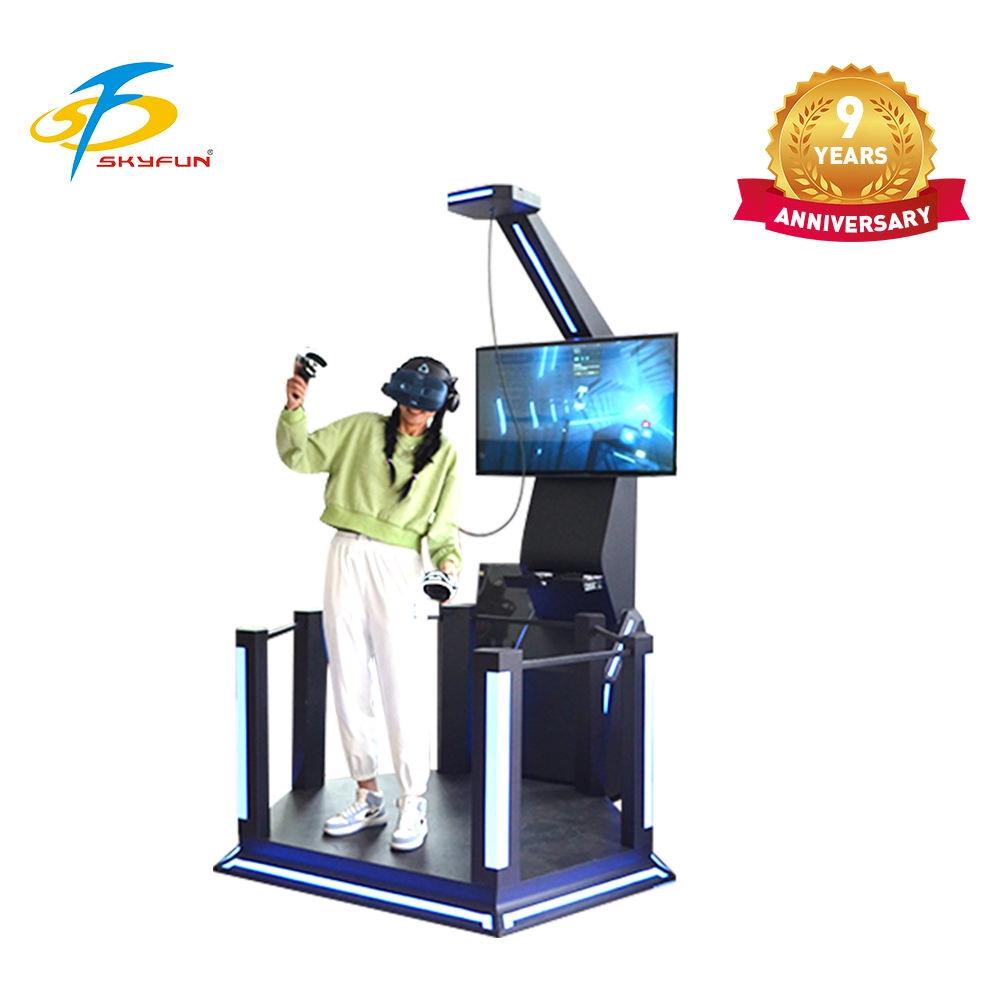
VRN0.1 VR Shooting HTC Adventure Park VR Game Simulador de juego de VR público Simulador de juego de VR de aeropuerto
Nuestro equipo de juegos de realidad virtual (VR) representa la cumbre de la tecnología de entretenimiento interactivo. Este sistema integral incluye funciones Mini HTC VR optimizadas para experiencias de juego de alta intensidad, en particular juegos de boxeo y simulaciones de acción. El equipo está diseñado para su uso comercial, priorizando la durabilidad, la seguridad del usuario y la eficiencia operativa.
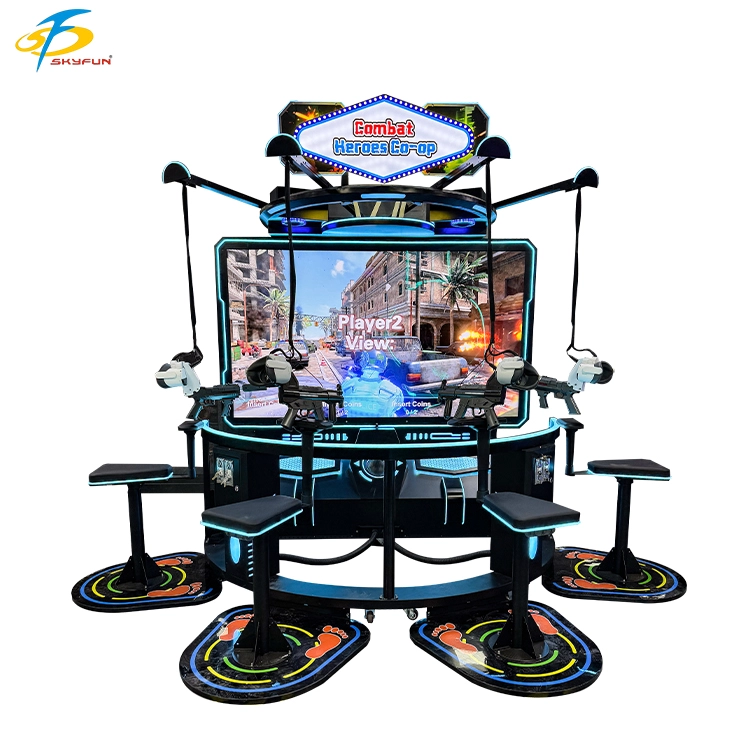
VRN0.1 Juego de disparos de realidad virtual para 4 jugadores, 360 grados, inmersivo, 4K, plataforma de movimiento, arcade, multijugador, simulador táctico
La industria de las salas de juegos de realidad virtual (RV) se ha enfrentado durante mucho tiempo a una dicotomía crucial: cómo ofrecer experiencias profundamente inmersivas sin comprometer la eficiencia operativa. Los sistemas tradicionales de RV basados en gafas, si bien tecnológicamente potentes, suelen presentar importantes inconvenientes: problemas de higiene, procedimientos de colocación y retirada lentos y el frecuente problema del mareo por movimiento. Además, los juegos de disparos de RV convencionales a menudo no ofrecen la interactividad dinámica y profundamente atractiva que realmente motiva a los jugadores a repetir la experiencia.
Skyfun, un pionero reconocido en soluciones de entretenimiento inmersivo conmás de una década de experiencia especializada,se revela con orgulloVR Strike Force: 4-Player Assault: una experiencia innovadoraJuego de disparos en realidad virtual sin gafas. Diseñado meticulosamente para maximizar los ingresos por metro cuadrado y ofrecer una satisfacción inigualable al jugador, VR Strike Force redefinirá el panorama del entretenimiento basado en la ubicación, ofreciendo una experiencia auténtica.Experiencia en "Operación de Asalto".
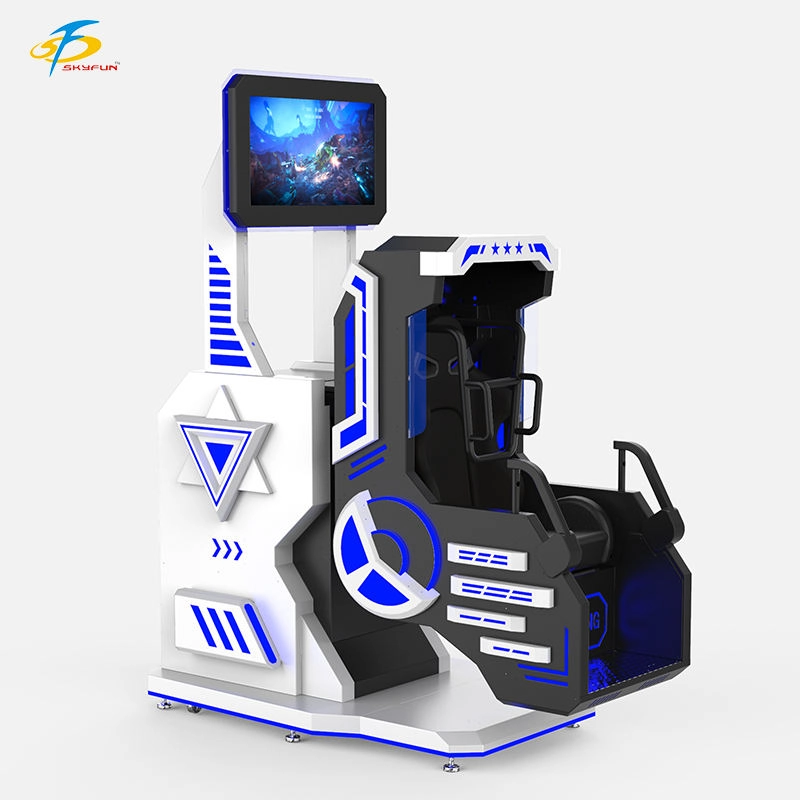
Equipo de cine de realidad virtual experiencial con rotación de 360 grados, máquina de juegos de entretenimiento de realidad virtual 360VR de un solo asiento.
Inversiones reales de 360° = Gritos reales.
Experimenta la fuerza G extrema con volteretas completas. La pantalla externa en vivo convierte cada partida en un espectáculo espectacular. Máxima emoción, cero riesgos y un alto retorno de la inversión para cualquier centro comercial o sala de juegos.

 Escanear código QR
WhatsApp: +8618127818571
Escanear código QR
Guangzhou Skyfun Technology Co., Ltd.
skyfunvrgame
Juego skyfun